Alfen EV Chargers#
This guide is for installers configuring an Alfen charger to be monitored or controlled by Octave's EMS.
Prerequisites#
- You have access to ACE Service Installer.
- You have the charger credentials.
- The chargers have the required licence keys
To enable Modbus functionality, the charging station must have Active Load Balancing enabled, which requires a licence key. For more information, contact Alfen.
Configure Active Load Balancing (EMS via Modbus TCP)#
-
Open ACE Service Installer and log in.
-
In the left sidebar, select the charging station.
- Log in to the charging station when prompted.
-
In the top menu, open Load Balancing.
-
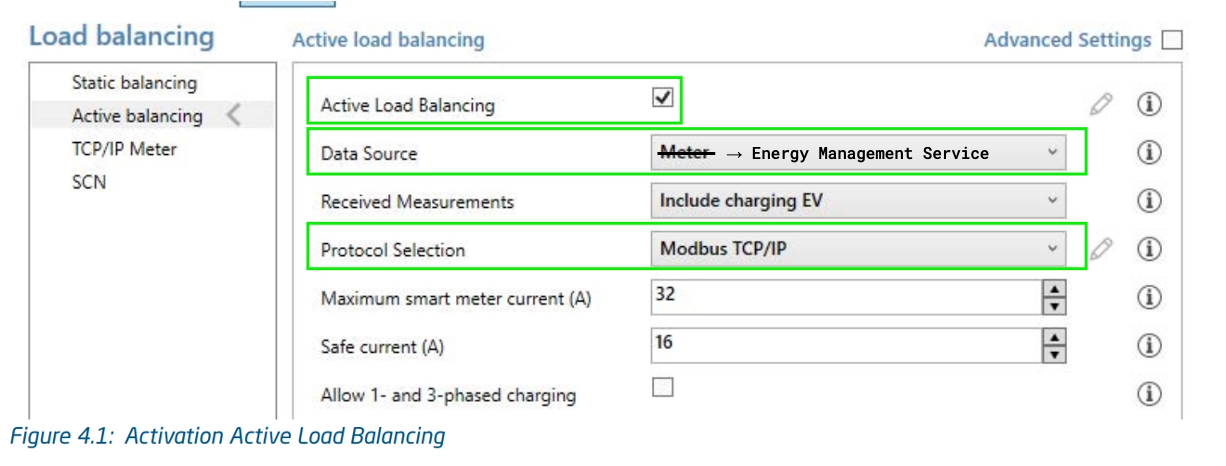
In the left menu, select Active balancing.
- Enable Active Load Balancing.
- Set Data Source to Energy Management System.
- Select Modbus TCP/IP.
-
In the left sidebar menu click TCP/IP EMS
- Select the control mode: Socket. This means each socket is controlled individually.
-
Enter the Validity time in seconds: 60 seconds.
Validity time is the period after which the charging station assumes the EMS is no longer available. If the charging station registers the EMS as unavailable, it defaults to the Safe Current values specified in the Active Balancing parameters.