Scenario 4 — Additional address on ETH0 for a second subnet on the same switch#
Level: intermediate · Devices: EdgeBox, RevPi (eth0)
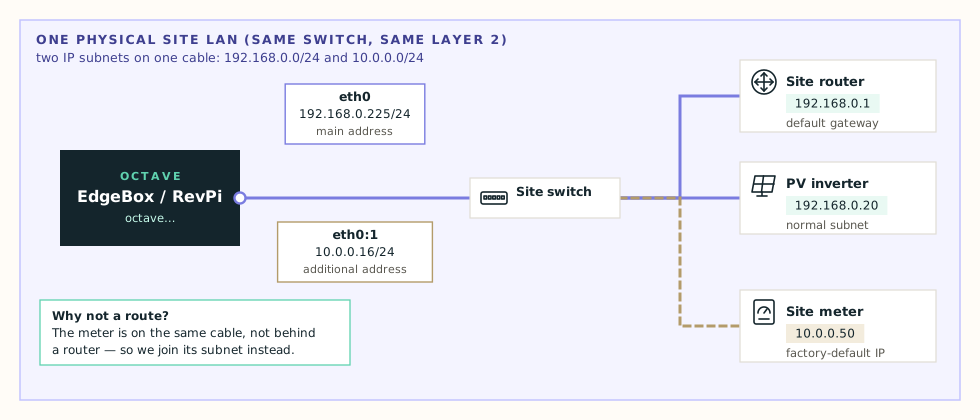
When this applies#
A device is physically on the same network as eth0 — same switch, no router in between — but uses an address from a different range. Typical examples:
- a meter or inverter still on its factory default IP, such as
10.0.0.50; - an installer set the device up for their laptop and never changed it;
- a separate OT range that shares the same switches as the IT range.
The device has no gateway that knows about the Octave device, so a route can't help. Instead, the Octave device joins that subnet too with an additional address on eth0.
Tip
Additional address or primary route? Ask: is there a router between the Octave device and the target? No router → additional address (this page). Router → primary route (Scenario 5).
What the device needs#
| Field | Value (example) |
|---|---|
| eth0 main address | unchanged — DHCP or 192.168.0.225/24 |
| Additional IPs / CIDRs | 10.0.0.16/24 — a free address in the meter's subnet, with prefix |
The additional address is attached as eth0:1, the next one as eth0:2, and so on. It never gets a gateway, and it's re-applied automatically after every DHCP event, so it works with DHCP and Static mode alike.
Configure#
- Find a free address in the target's subnet. Ask the site, or pick one far from the device's own address. Avoid
.1and.254, which routers often use. - Open Edit configuration → Primary interface (eth0) – advanced.
- Tick Enable additional primary network addresses.
- Enter
10.0.0.16/24under Additional IPs / CIDRs. Use + Add address for more. - Press Test, then Apply.
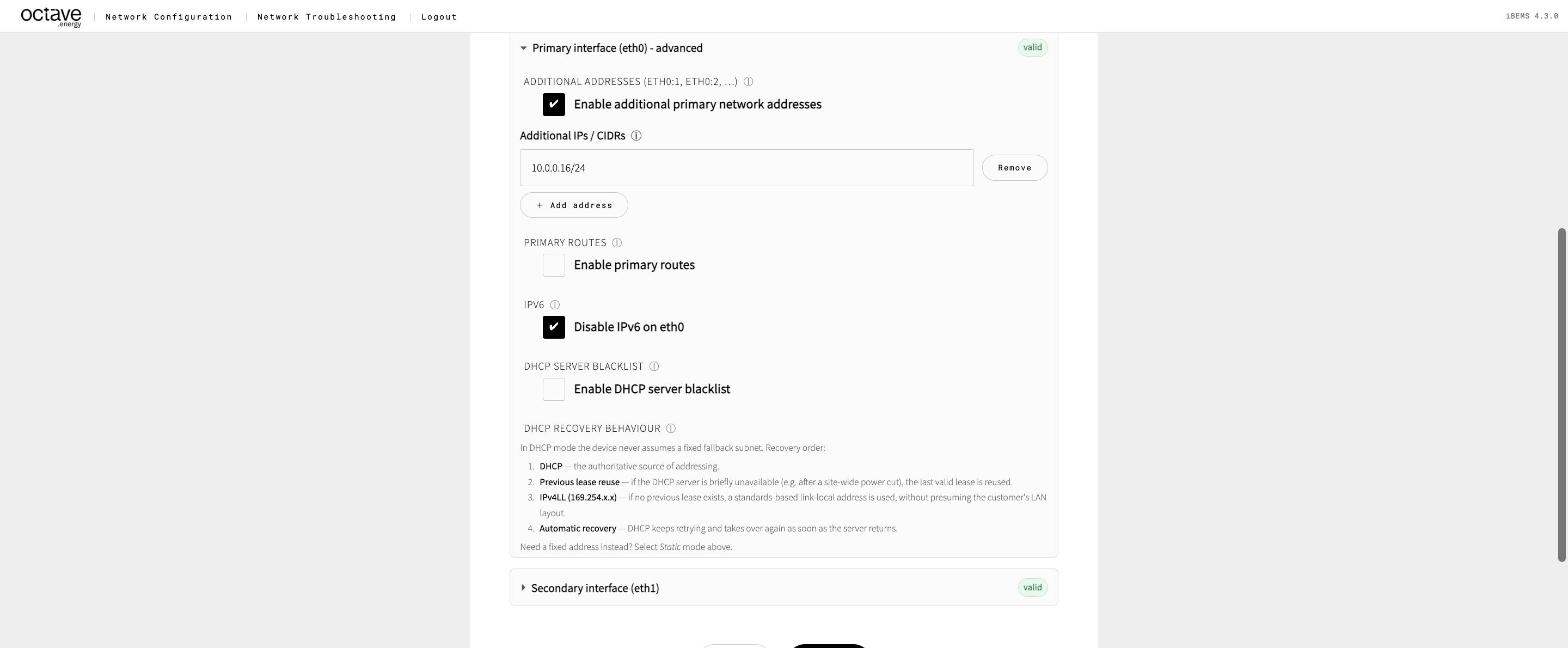
Additional addresses on eth0
Check it#
- Troubleshooting → Network Overview:
eth0lists both addresses, and there's a route10.0.0.0/24oneth0with no gateway. - Connectivity to
10.0.0.50with ARPing on eth0. An ARPing reply proves the meter is on the same cable. - Port / Service Scan
10.0.0.50with the Modbus preset.
Watch out for#
- The address is already in use. Run Connectivity with ARPing to the address you want before adding it. No reply = free.
- Overlap with the Octave range. An additional address in the
eth1range sends Octave devices without a direct link route toeth0. That's sometimes intended — see Scenario 6. - Prefer to fix the device. An additional address is a workaround. If the site agrees, re-addressing the meter into the main subnet is cleaner.