Scenario 5 — Primary routes to devices behind a site router#
Level: advanced · Devices: EdgeBox, RevPi (eth0)
When this applies#
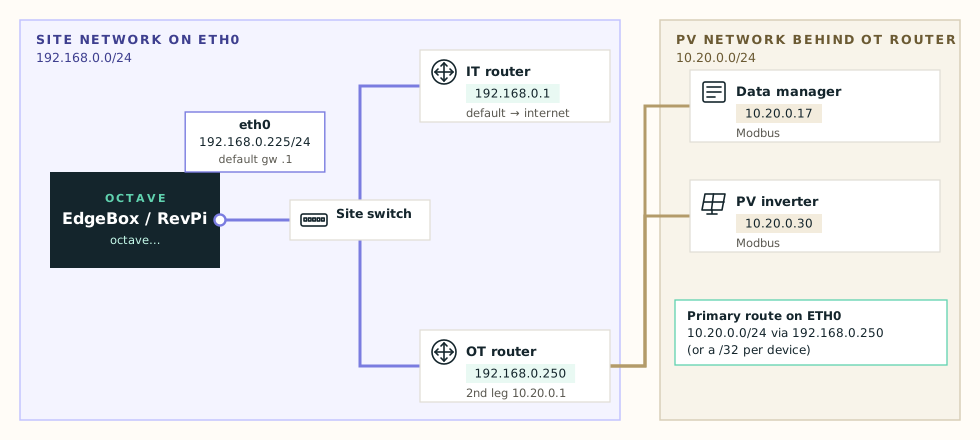
The device you need — for example a PV data manager — is in a different subnet behind a router, and that router is not the Octave device's default gateway.
Without a route, the Octave device sends that traffic to the default gateway (the IT router). The IT router doesn't know the PV network and drops it, or sends it to the internet.
Note
If the router in front of the device is the default gateway, you usually need no route at all — the default route already goes there. Add a route only when the default gateway is a different router, or when the destination overlaps a connected subnet (Scenario 6).
Network route or host route?#
| Type | Destination | Use when |
|---|---|---|
| Network route | 10.20.0.0/24 | The whole subnet lives behind the router. One route covers every device. |
| Host route | 10.20.0.17/32 | Only specific devices are behind the router, or the range overlaps another one. One route per device. |
What the device needs#
| Destination | Gateway |
|---|---|
10.20.0.0/24 | 192.168.0.250 — the OT router's address in eth0's subnet |
Info
The gateway must be directly reachable from eth0. 192.168.0.250 is inside 192.168.0.0/24, so it works. The router's address on the far side (10.20.0.1) never works.
The form doesn't check this for you. A route gateway outside eth0's subnet is accepted as valid, and Test doesn't probe routes. Check the gateway yourself with Connectivity (ARPing on eth0) before you Apply.
Configure#
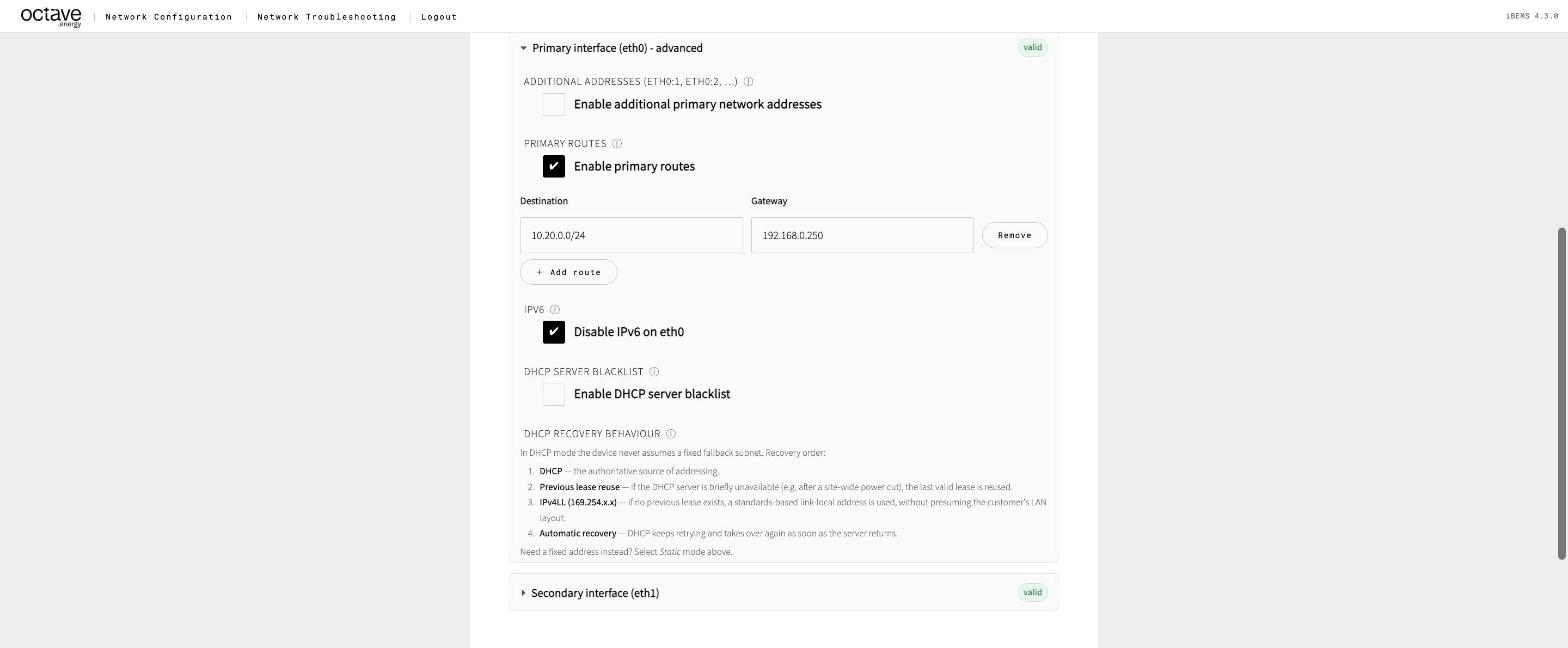
- Open Edit configuration → Primary interface (eth0) – advanced.
- Tick Enable primary routes.
- Click + Add route and fill in Destination
10.20.0.0/24and Gateway192.168.0.250. Use a/32destination for a single device. - Press Test, then Apply.
Primary routes on eth0
Check it#
- Troubleshooting → Network Overview: route
10.20.0.0/24via192.168.0.250oneth0. - Route Test
10.20.0.17→ Interfaceeth0, Gateway192.168.0.250. - Connectivity to the router
192.168.0.250first, then to10.20.0.17. - Traceroute
10.20.0.17— the first hop must be192.168.0.250. - Port / Service Scan
10.20.0.17with the Modbus preset.
Watch out for#
The return path. The PV device must also know how to answer: its gateway has to route traffic for 192.168.0.0/24 back. When the OT router is the PV device's default gateway, this works automatically. If traceroute reaches the router but the device stays silent, see Device behind a router.
Firewalls on the router. Many OT routers block Modbus (502) or ping between their ports by default. The site has to allow traffic from the Octave device's IP.
NAT. Some routers translate addresses, so the device you need may have a different address on the Octave side. Ask the site which address to use.