Scenario 6 — Overlapping subnets#
Level: expert · Devices: RevPi
This is the most complex setup we support. It combines Scenarios 3, 4 and 5, with one extra problem: the same IP range is used in three different places.
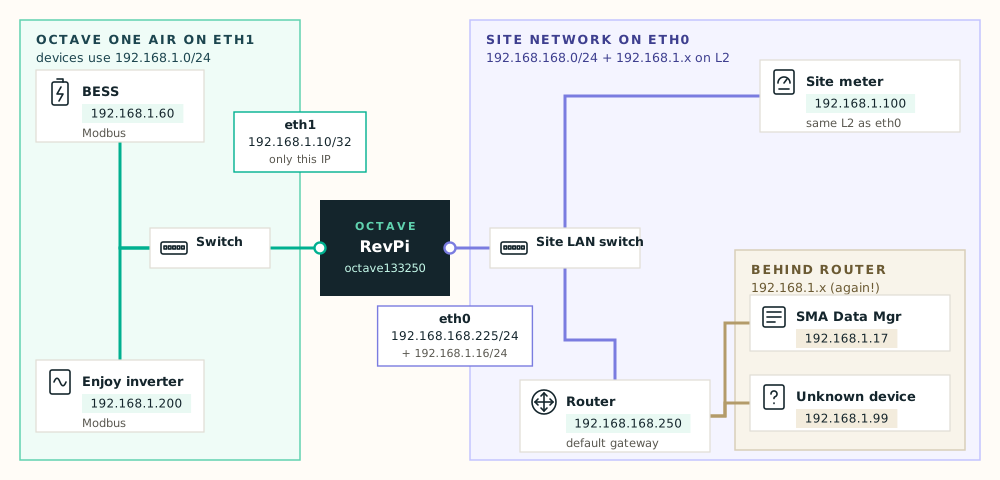
The situation#
| Where | Devices | Range |
|---|---|---|
Octave One Air network on eth1 | BESS 192.168.1.60, Enjoy inverter 192.168.1.200 | 192.168.1.x |
Site LAN on eth0, same switch | Site meter 192.168.1.100 | 192.168.1.x |
Behind router 192.168.168.250 | SMA Data Manager 192.168.1.17, unknown device 192.168.1.99 | 192.168.1.x |
Site LAN on eth0 | RevPi, router, internet | 192.168.168.0/24 |
A normal router would give up here: three places, one range. The RevPi can handle it because the most specific route wins. A /32 route for one address always beats a /24 for the whole range. See Routes and "most specific wins".
The configuration#
| # | Section | Field | Value | Why |
|---|---|---|---|---|
| 1 | Primary interface (eth0) | Static IP / CIDR, gateway | 192.168.168.225/24, gateway 192.168.168.250 | Main site address and internet (Scenario 2) |
| 2 | Secondary interface (eth1) | Secondary local IP | 192.168.1.10 | Becomes 192.168.1.10/32. The default .17 can't be used: the SMA Data Manager already has it. |
| 3 | Secondary interface (eth1) | Direct link routes | 192.168.1.60, 192.168.1.200 | Exactly these two go to the Octave network (Scenario 3) |
| 4 | eth0 – advanced | Additional IPs / CIDRs | 192.168.1.16/24 | Puts the RevPi in the meter's subnet on the site switch (Scenario 4) |
| 5 | eth0 – advanced | Primary routes | 192.168.1.17/32 via 192.168.168.250, 192.168.1.99/32 via 192.168.168.250 | Sends the two remote devices to the router instead of the switch (Scenario 5) |
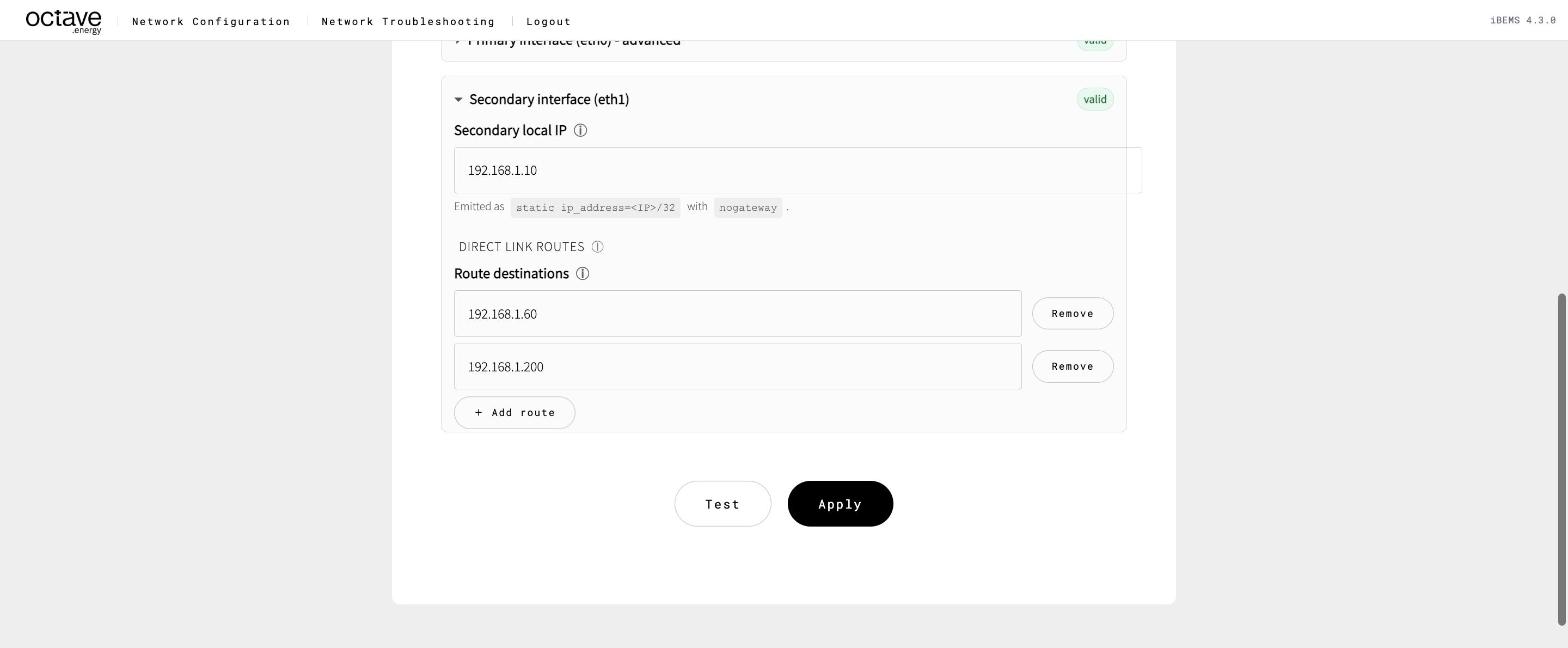
eth1 with a non-default local IP and direct link routes
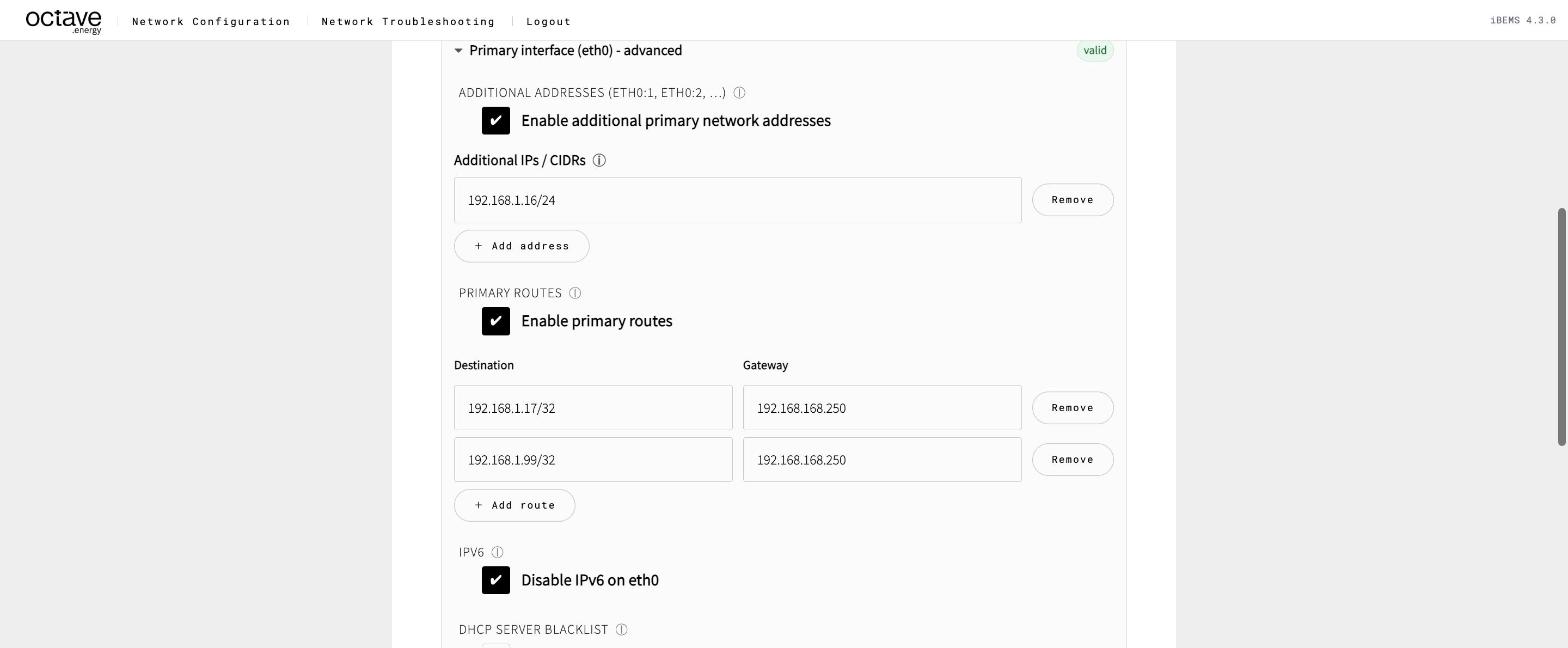
eth0 advanced: additional address and host routes via the router
Build it in this order and Test and Apply after each step. Start with eth1 (rows 2–3): it doesn't affect your connection to the page.
The resulting routing table#
| Destination | Gateway | Mask | Flags | Iface | Purpose |
|---|---|---|---|---|---|
192.168.1.60 | 192.168.1.10 | 255.255.255.255 | UGH | eth1 | BESS — direct link route |
192.168.1.200 | 192.168.1.10 | 255.255.255.255 | UGH | eth1 | Enjoy inverter — direct link route |
192.168.1.99 | 192.168.168.250 | 255.255.255.255 | UGH | eth0 | Unknown device — primary route |
192.168.1.17 | 192.168.168.250 | 255.255.255.255 | UGH | eth0 | SMA Data Manager — primary route |
192.168.1.0 | 0.0.0.0 | 255.255.255.0 | U | eth0 | Additional address eth0:1 (site meter) |
192.168.168.0 | 0.0.0.0 | 255.255.255.0 | U | eth0 | Site network |
0.0.0.0 | 192.168.168.250 | 0.0.0.0 | UG | eth0 | Default route |
Flags: U = up · G = uses a gateway · H = host route (one address). The eth1 routes show the RevPi's own eth1 address as their gateway. That's how a direct link route works: "this host is directly on eth1".
Packet by packet#
| Destination | Matches | Leaves via | Route Test shows |
|---|---|---|---|
192.168.1.60 BESS | /32 direct link route | eth1, directly | Interface eth1, source 192.168.1.10 |
192.168.1.200 Enjoy | /32 direct link route | eth1, directly | Interface eth1, source 192.168.1.10 |
192.168.1.100 meter | 192.168.1.0/24 | eth0, directly on the switch | Interface eth0, source 192.168.1.16 |
192.168.1.17 SMA | /32 primary route | eth0 → 192.168.168.250 | Interface eth0, gateway 192.168.168.250 |
192.168.1.99 unknown | /32 primary route | eth0 → 192.168.168.250 | Interface eth0, gateway 192.168.168.250 |
| anything else | default | eth0 → 192.168.168.250 | Interface eth0, gateway 192.168.168.250 |
Check it#
Run Route Test for every row in the table above and compare it with the last column. Then Connectivity and Port / Service Scan (Modbus) for each device.
Watch out for#
Warning
Every new device needs its own route. A new Octave device on eth1 needs a direct link route. Otherwise 192.168.1.0/24 on eth0 catches it and sends it to the site switch. A new device behind the router needs a /32 primary route. Otherwise it's looked for on the site switch, too.
- Duplicate addresses can't be solved. If two devices in different places both use, say,
192.168.1.60, the RevPi can only reach one of them. One of them must be re-addressed. - The RevPi's own addresses must be unique across the whole range — here
192.168.1.10and192.168.1.16. - Modbus allow-lists. The site meter sees the RevPi as
192.168.1.16, not192.168.168.225. Put that address in the meter's allowed-client list. - Document the site. Copy The configuration table into the site documentation. The next engineer will need it.
- Look for a simpler fix first. Re-addressing the Octave network to a range the site doesn't use — secondary IP and devices in, say,
192.168.110.x— turns this back into Scenario 3. Discuss that before building this.