Octave network guide#
This guide helps installers and operations teams configure and troubleshoot the network on Octave edge devices — the RevPi and the EdgeBox — in site OT networks.
You don't need to be a network engineer. Each scenario starts with a picture of the site, explains what the device needs, and then shows the exact settings in the device's Network Configuration and Network Troubleshooting pages.
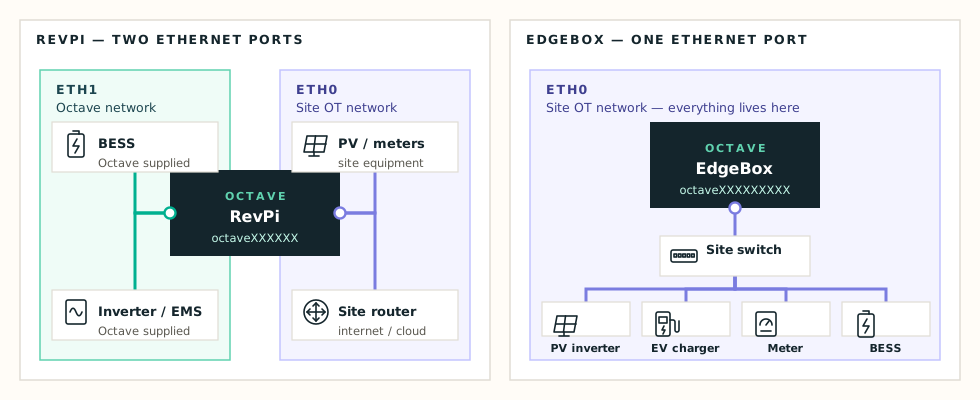
Interface roles on RevPi and EdgeBox
The two devices in one minute#
| RevPi | EdgeBox | |
|---|---|---|
| Ethernet ports | 2 — eth0 and eth1 | 1 — eth0 |
eth1 (secondary interface) | Isolated Octave network: the BESS, EMS and inverters we ship | — |
eth0 (primary interface) | Site OT network: PV, EV chargers, site meters, router / internet | Everything: site devices and internet |
| Typical complexity | Medium to high | Low to medium |
Info
eth0 is always the site network. eth1 is always the Octave network. Site equipment never goes on eth1, and eth1 never has a gateway — the device enforces this.
How to open the pages#
- Connect your laptop to the same network as the device.
- Browse to
http://octave<serial>.local/network. The serial is the last 9 digits of the number on the device sticker; older devices use the last 6 digits. - Log in with the installer credentials. See Local Web Interface for the login steps and credentials.
The top bar has two pages:
| Page | What it does | Risk |
|---|---|---|
| Network Configuration | Shows the live network state, and changes IP addresses, gateways and routes | Apply can make the device unreachable |
| Network Troubleshooting | Runs network diagnostics from the device | None — read-only, use freely |
Golden rules#
- Survey before you configure. Write down every device you need to reach: name, IP address, and how it's connected — same switch, or behind a router. The site survey checklist helps.
- Always press Test before Apply. Applying rewrites the device's network configuration. A wrong value can make the device unreachable, and then someone has to go to site.
- Change one thing at a time, test it, apply it, check it, then move on.
- Prove it works on the Troubleshooting page — before and after every change.
Where to start#
| Your site looks like… | Go to |
|---|---|
| One network, the router hands out addresses | Scenario 1 — DHCP |
| One network, but you were given a fixed IP | Scenario 2 — Static IP |
| RevPi with Octave battery / inverter on the second port | Scenario 3 — RevPi with isolated ETH1 |
| A device on the same switch uses a "strange" IP range | Scenario 4 — Additional address on ETH0 |
| A device sits behind another router | Scenario 5 — Primary routes |
| The Octave range also appears on the site | Scenario 6 — Overlapping subnets |
| Something doesn't work | Troubleshooting |