Traffic leaves on the wrong interface#
Symptom: a device is unreachable, and Route Test shows a different interface than you expect. Almost always seen on a RevPi after a new Octave device is added on eth1.
Example#
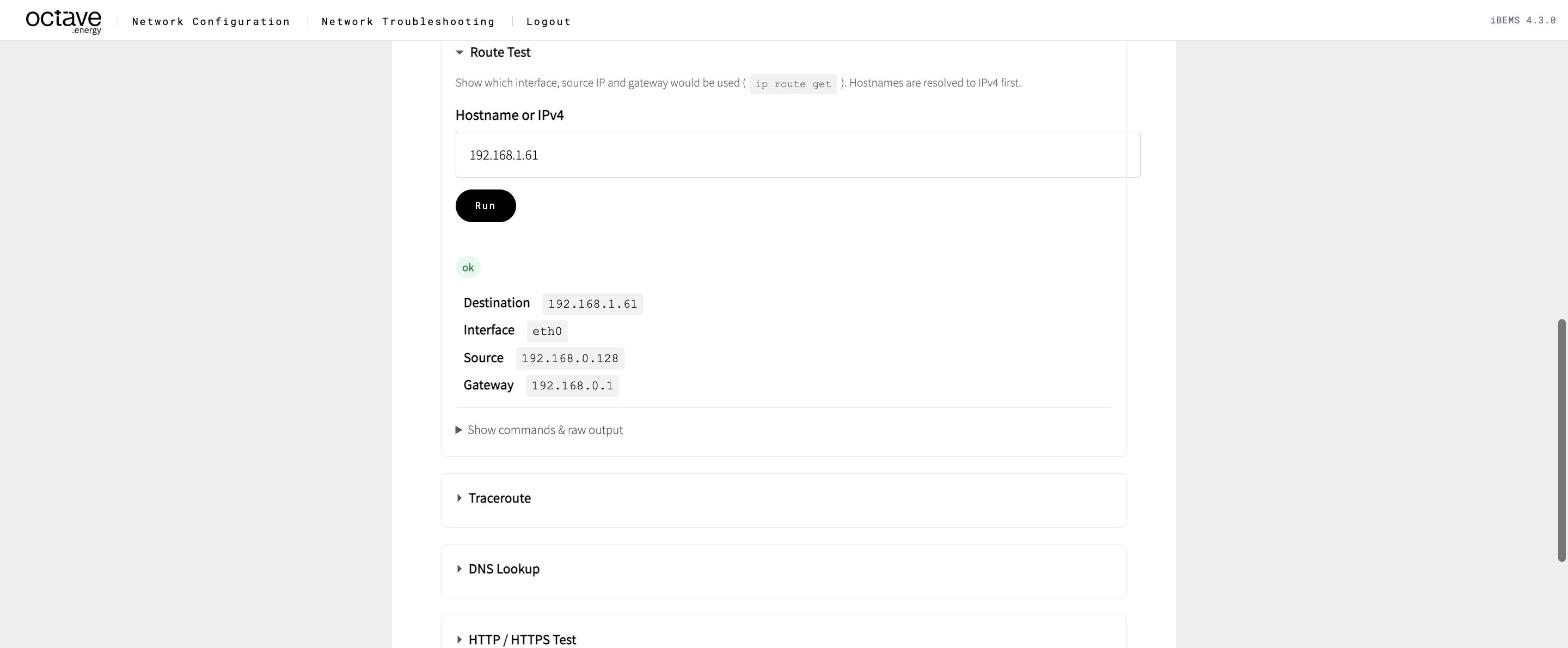
The RevPi has direct link routes for 192.168.1.60 and 192.168.1.200. A second battery at 192.168.1.61 was added, but nobody added a route for it. Route Test for 192.168.1.61:
| Field | Value |
|---|---|
| Interface | eth0 |
| Source | 192.168.0.128 |
| Gateway | 192.168.0.1 — the site router |
The RevPi sends the battery's traffic to the site router, which forwards it towards the internet. The battery never sees it.
Why it happens#
The RevPi picks the most specific matching route:
- A
/32route for this exact address — a direct link route oneth1, or a primary host route oneth0→ use it. - Otherwise the longest matching subnet — for example an additional address
192.168.1.16/24oneth0. - Otherwise the default route, via the site router on
eth0.
eth1 is always a /32, so only devices with a direct link route ever leave through eth1.
Fix#
| Cause | Fix |
|---|---|
| New Octave device, no direct link route | Add it under Secondary interface (eth1) → Direct link routes |
| Device behind a router, no primary route (Scenario 6) | Add a /32 primary route via the router |
| Typo in a route destination | Correct the row |
Cables swapped between eth0 and eth1 | Swap them back — check with Ethernet Link and the Neighbors table |
After the fix, run Route Test again for every device on the site, not only the broken one.