Link down or no DHCP address#
Symptom A — no link#
Ethernet Link shows no link on eth0 or eth1, or the Connectivity card on the Configuration page shows the interface link as unreachable.
This is always physical:
- Is the cable in the right port? On a RevPi,
eth0is site andeth1is Octave. - Are the link lights on, at the device and at the switch?
- Try another cable and another switch port.
- Is the switch or device on the other end powered?
10 Mb/s or half duplex instead of 100/1000 full duplex → replace the cable, or ask the site to set the switch port to auto-negotiation.
Symptom B — eth0 has a 169.254.x.x address#
An address starting with 169.254. is a link-local address. The port has link, but no DHCP server answered and no previous lease was available. The device keeps retrying and switches back automatically once DHCP answers — see DHCP recovery.
| Check | How |
|---|---|
| Does the site actually use DHCP? | Ask the site. If not → Scenario 2 — Static IP. |
| Is the cable in a port in the right network / VLAN? | Ask the site which switch port to use. |
| Does the DHCP server only serve known devices (MAC filtering)? | Give the site the MAC of eth0 from Network Overview. |
| Does a DHCP offer arrive at all? | Press Test on the Configuration page (DHCP mode): DHCP offer received shows the server and the offered values. |
To reach a device in this state from your laptop, give the laptop a 169.254.x.x address too and browse to octave<serial>.local.
Symptom C — wrong DHCP server#
eth0 has an address, but in an unexpected range — for example from a 4G router or a forgotten test router on the same LAN. The live view on the Configuration page shows the DHCP server the lease came from.
Fix: remove the second DHCP server. If the site can't do that right away:
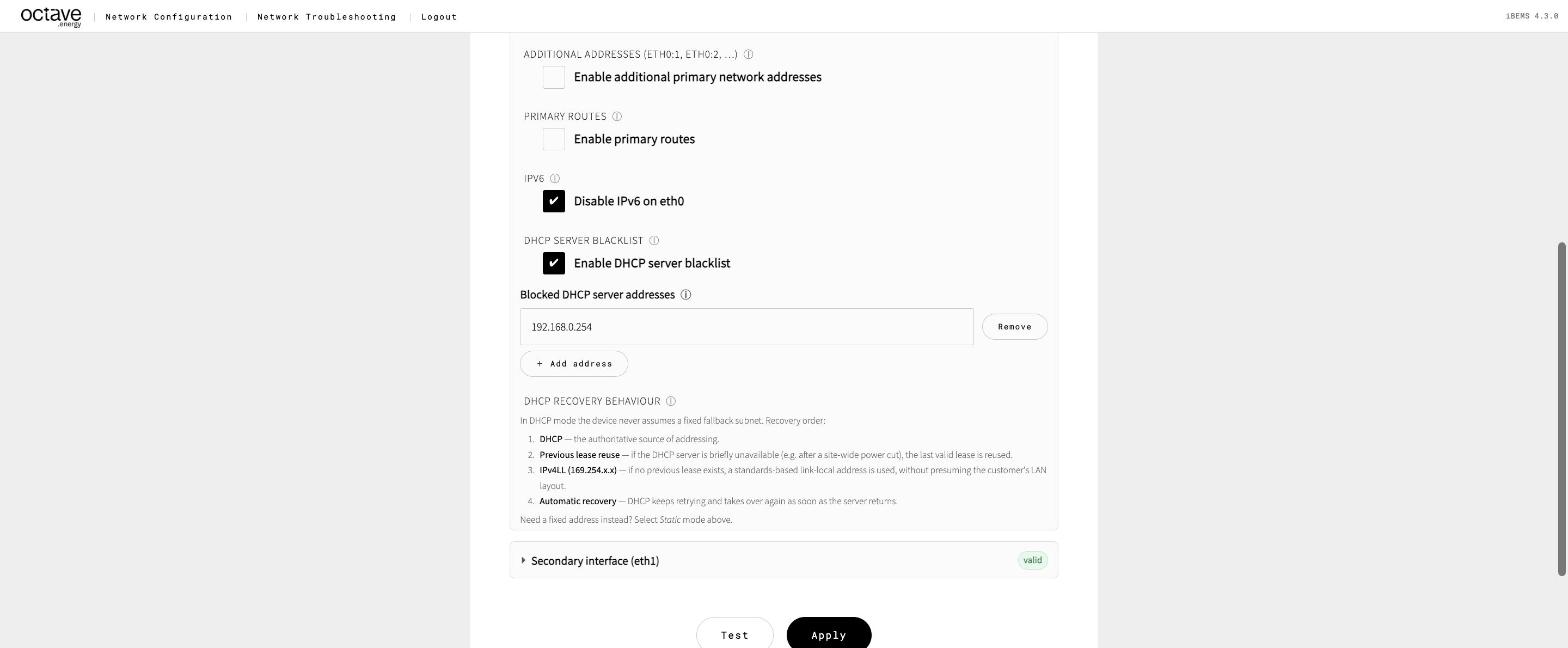
- Open Primary interface (eth0) – advanced → DHCP server blacklist.
- Tick Enable DHCP server blacklist and add the unwanted server's IP.
- Test — the DHCP offer should now come from the right server — then Apply.
Symptom D — IPv6 problems#
Some sites hand out IPv6 but don't actually route it, which slows or breaks cloud connections. Tick Disable IPv6 on eth0 in the advanced section, then Test and Apply.