Configure site limits#
This page is for installers configuring the limits of a site through Configuration > Site > Site Limits in the Octave Portal.
Site limits define the electrical boundaries the EMS must respect when controlling assets at your site. They protect against breaker trips, contractual violations and DSO penalties by capping how much power the site may draw from or inject into the grid, and by guarding against phase imbalance.
Important
Modifying these settings may influence your energy invoice and could lead to additional grid capacity costs or penalties. Ensure the configured limits comply with the physical and contractual limits agreed with your grid operator.
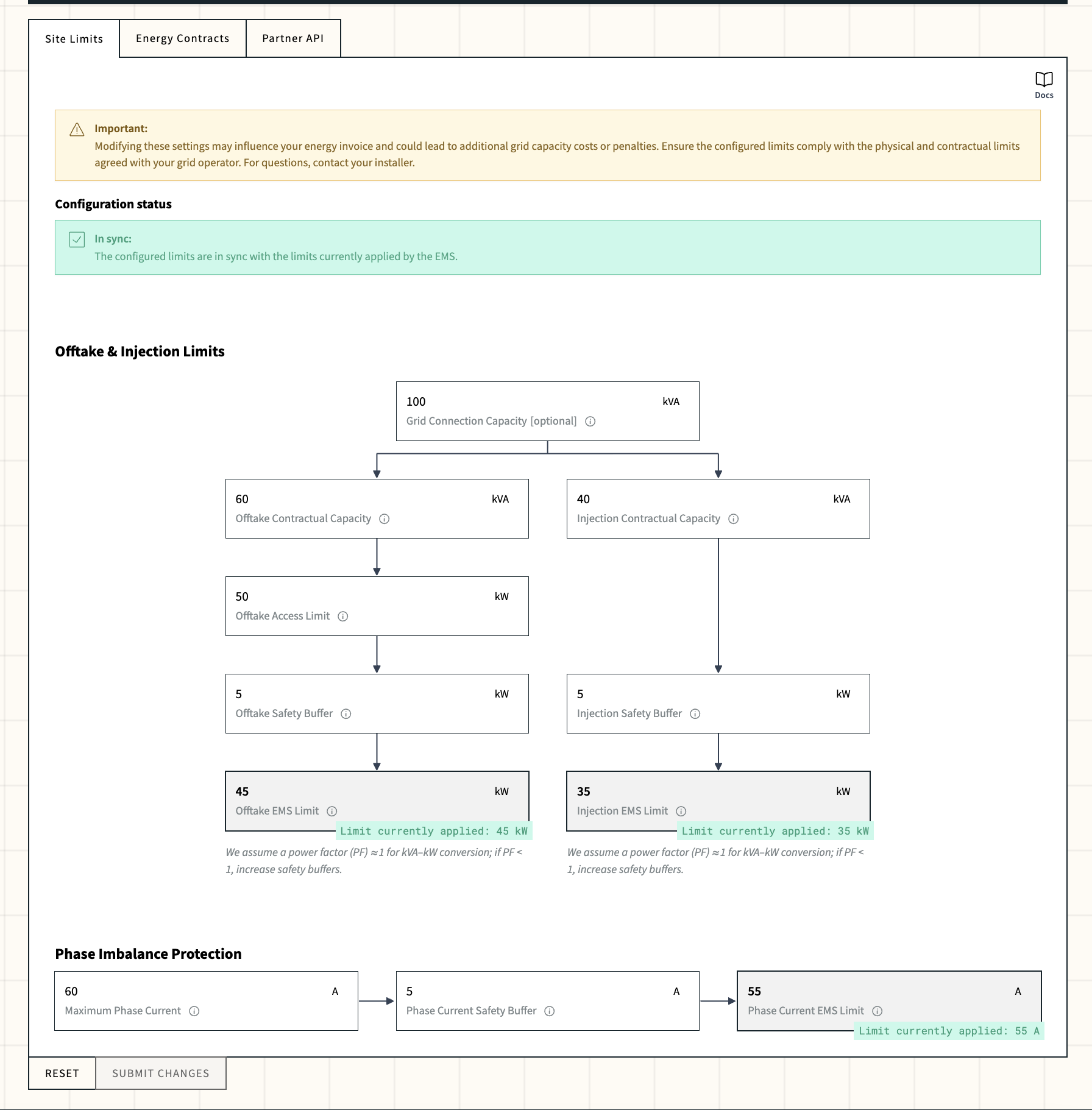
Site limit configuration in the portal
The following video provides a step-by-step guide on how to configure site limits.
The site limits hierarchy#
The EMS combines several inputs into the limits it actually enforces. They follow the physical and contractual hierarchy of a grid connection:
- Grid Connection Capacity: physical transformer / connection limit (kVA).
- Contractual Capacities: what the DSO or supplier allows (kVA), per direction.
- Access Offtake Limit: Flanders-specific toegangsvermogen (kW), offtake only.
- Safety Buffers: margin subtracted from the most restrictive limit (kW / A).
- Phase Imbalance Protection: current-per-phase limit (A) to protect the main breaker.
- Resulting EMS Limits: computed and enforced by the EMS (kW / A).
For each direction (offtake and injection), the EMS picks the most restrictive applicable limit and subtracts the safety buffer:
Prerequisites#
Before you configure site limits, make sure that:
- The site has a valid postal code in Site Settings. The region (Flanders, Wallonia, Brussels) is derived from it and drives validation.
- You have the grid connection agreement from your DSO or energy provider (for the contractual capacities).
- For sites in Flanders: you have looked up the access limit (toegangsvermogen) in the DSO portal (Fluvius).
- You know the transformer rating and the main breaker current rating, for phase imbalance protection.
Configure the limits#
Open Configuration > Site > Site Limits. The page is split into two sections: Offtake & Injection Limits and Phase Imbalance Protection.
1. Set the offtake and injection limits#
Follow the flow from top to bottom in the Offtake & Injection Limits section. Each downstream field can only further restrict the upstream value.
- (Optional) Enter the Grid Connection Capacity in kVA. This is the physical upper bound for both offtake and injection, typically the rated apparent power of your transformer.
- Enter the Offtake Contractual Capacity and Injection Contractual Capacity in kVA. These are mandatory and must each be ≤ the grid connection capacity.
- (Flanders only) Enter the Offtake Access Limit in kW. This is the toegangsvermogen from your DSO portal. It must be ≤ the offtake contractual capacity (after kVA→kW conversion).
- Enter the Offtake Safety Buffer and Injection Safety Buffer in kW.
- The offtake buffer must be ≥ 5 kW or ≥ 5% of the most restrictive limit (the access limit if applicable, otherwise the contractual capacity).
- The injection buffer must be ≥ 5 kW.
The Offtake EMS Limit and Injection EMS Limit fields are read-only. They show the limit that will be applied based on your inputs once you save (e.g. Limit currently applied: 55 kW).
Power factor
The kVA→kW conversion assumes a power factor (PF) ≈ 1. If your site operates at a lower PF, increase the safety buffers to compensate.
2. Configure phase imbalance protection#
The Phase Imbalance Protection section guards the main breaker against single-phase overcurrent.
- Enter the Maximum Phase Current in amperes (A): the trip current of the main breaker. For a 3-phase transformer this is typically the transformer rating in kVA divided by 0.69 kV.
- Enter the Phase Current Safety Buffer in A. This must be ≥ 5% of the maximum phase current.
Warning
Both fields must be set together. If you enter one, you must enter the other, otherwise the EMS refuses to save.
The Phase Current EMS Limit is computed as Maximum Phase Current - Phase Current Safety Buffer and is shown read-only (e.g. Limit currently applied: 296 A).
3. Submit your changes#
When all required fields are filled in:
- Click SUBMIT CHANGES to validate and save the new limits.
- Click RESET to discard your edits and restore the currently saved values.
If any validation rule fails, the offending fields are highlighted with the corresponding error message. Fix the inputs and submit again.
Configuration status and sync with the edge device#
Once limits have been configured at least once for the site, a Configuration status banner appears at the top of the page. It tells you whether the values shown in the portal are in sync with the limits the edge device is currently enforcing. The banner is hidden when nothing has been configured yet.
Each EMS Limit field also shows a Limit currently applied: … badge with the value reported by the edge device. The badge color and the banner reflect the same sync state:
| State | Color | Banner | What it means |
|---|---|---|---|
| In sync | Green | In sync: the configured limits are in sync with the limits currently applied by the EMS. | The values entered in the portal match what the edge device is enforcing. No action needed. |
| Editing (not yet submitted) | Purple | Editing: the resulting limits differ from the limits currently applied by the EMS. Please submit your changes if you want to proceed. | You have unsaved changes. Click SUBMIT CHANGES to push them to the edge device, or RESET to discard. |
| Submitted but out of sync | Red | The resulting limits were not successfully sent to the EMS. | The configuration was submitted but the edge device has not confirmed the new values. Check the EMS Unreachable alert. If the issue persists, contact support@octave.energy. |
Info
When the Phase Imbalance Protection fields are left empty, the edge device reports Limit currently applied: 1000000 A (the no-limit sentinel) and the Phase Current EMS Limit shows a dash (-).
Field reference#
Offtake & Injection Limits#
| Field | Unit | Required | Description |
|---|---|---|---|
| Grid Connection Capacity | kVA | Optional | Physical apparent-power limit of the grid connection or transformer. Upper bound for both directions. |
| Offtake Contractual Capacity | kVA | Yes | Maximum apparent power the site may draw from the grid per the connection agreement. |
| Injection Contractual Capacity | kVA | Yes | Maximum apparent power the site may inject into the grid per the connection agreement. |
| Offtake Access Limit | kW | Yes in Flanders | Toegangsvermogen for offtake. Look it up in the DSO portal (e.g. Fluvius). |
| Offtake Safety Buffer | kW | Yes | Margin subtracted from the most restrictive offtake limit before enforcement. |
| Injection Safety Buffer | kW | Yes | Margin subtracted from the most restrictive injection limit before enforcement. |
| Offtake EMS Limit | kW | Computed | The offtake limit actually enforced by the EMS. |
| Injection EMS Limit | kW | Computed | The injection limit actually enforced by the EMS. |
Phase Imbalance Protection#
| Field | Unit | Required | Description |
|---|---|---|---|
| Maximum Phase Current | A | Optional (paired with buffer) | Trip current of the main breaker per phase. Typically transformer kVA / 0.69 kV. |
| Phase Current Safety Buffer | A | Optional (paired with max) | Margin subtracted from the maximum phase current. Must be ≥ 5% and ≤ the maximum phase current. |
| Phase Current EMS Limit | A | Computed | Per-phase current actually enforced by the EMS. |
Troubleshooting#
These are common error messages you may encounter when configuring site limits, with guidance on how to resolve them:
Cannot validate the site limits if the region is unknown
The site has no valid postal code. Open Site Settings, set a correct postal code, then retry.
Offtake / Injection contractual capacity is mandatory
These fields are required for all sites. Fill them in using the values from your grid connection agreement.
For a site located in Flanders, offtake access limits are mandatory
Look up the toegangsvermogen in your DSO portal (e.g. Fluvius) and enter it in Offtake Access Limit.
The offtake access limit must be less than or equal to the offtake contractual capacity
Lower the access limit, or raise the contractual capacity if your DSO agreement allows it. The access limit is in kW and the contractual capacity is compared after kVA→kW conversion (PF = 1 by default).
The offtake safety buffer must be ≥ 5 kW or ≥ 5% of the offtake access limit / contractual capacity
Raise the offtake safety buffer to at least 5 kW, or to 5% of whichever upstream limit applies.
The phase current safety buffer must be greater than or equal to 5% of the maximum phase current
Increase the phase current safety buffer to at least 5% of the maximum phase current.
When the maximum current per phase is set, the safety current buffer must also be set (and vice versa)
Fill in both Maximum Phase Current and Phase Current Safety Buffer, or clear both fields.
FAQ#
How should I set the safety buffers?
Octave EMS cannot forecast uncontrolled loads (e.g. machines with high ramping rates), so sudden increases may push the site above its limits temporarily. In such cases, there are only a few seconds (typically < 5 s) to bring the site back within limits.
We therefore recommend defining a buffer (≥ 5 kW) based on the largest 1-second change in site power observed during commissioning, when steered assets are idle. If trips occur, the buffer should be revised.